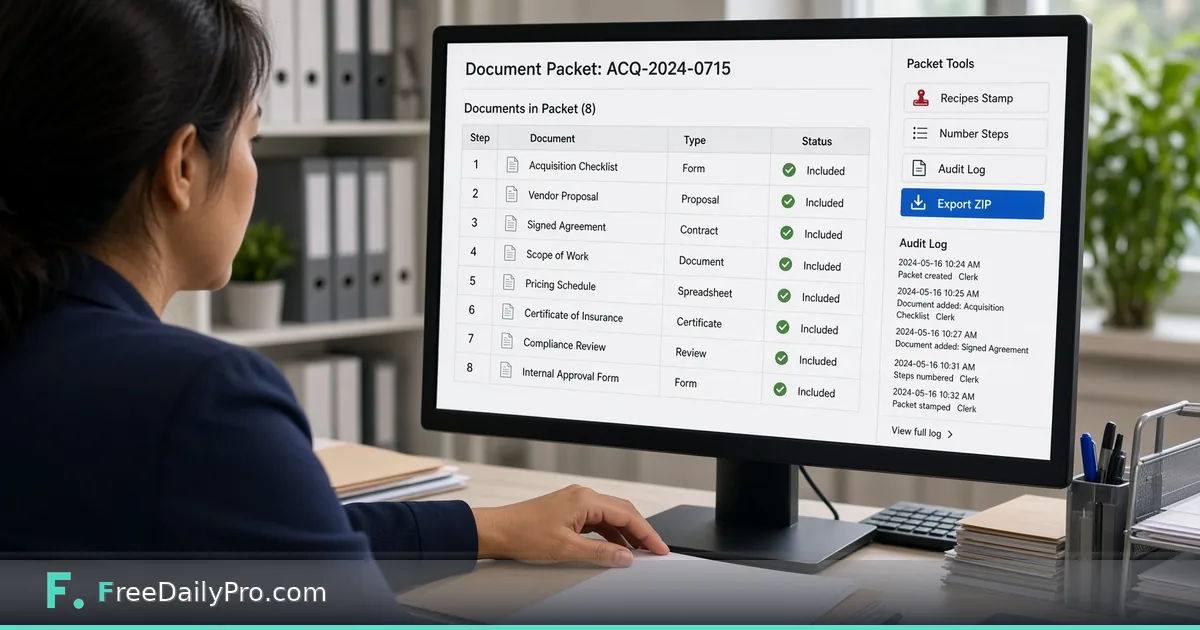
Stamp, Number and Hand Off a Document Batch
Build an office document packet with ordered files, multi-step recipes, an audit log, and one-click ZIP export in your browser.
Jordan Hale coordinates vendor onboarding for a regional logistics firm in Charlotte, North Carolina. A single vendor file can include a checklist, proposal, signed agreement, insurance certificate, and pricing schedule—each arriving as a separate scan. Document Operations Desk is the workflow product for general office packets: ordered documents, recipes from scan to sign, an audit log, and one-click packet export.
Document Operations vs Legal Production Desk
Legal Production Desk is for legal productions with Bates ranges, production logs, and withheld lists. Document Operations Desk is for general office packets—loan files, onboarding packs, claims, vendor files. It orders documents, runs your recipe on each one, and exports a ZIP with a manifest. Do not force Bates-style production habits onto a routine office packet if you only need order, process, and hand-off.
Sibling engines the desk can lean on include OCR PDF, Redact PDF, and Merge PDF. Browse pdf tools when you need a one-off outside a packet project.
Worked example: Vendor packet ACQ-2026-0715
- Coordinator: Jordan Hale
- Packet name: ACQ-2026-0715
- Documents (8): acquisition checklist, vendor proposal, signed agreement, scope of work, pricing schedule, certificate of insurance, compliance review, internal approval form
- Recipe: the Share safely preset (OCR, redact, number pages, compress)
- Output: one ZIP holding the processed documents in order, the audit log CSV, the recipe file and a manifest with checksums
Done means every document is either processed in order or explicitly skipped with a note—not missing page 7 of the insurance cert.
Steps on Document Operations Desk
- Open Document Operations Desk and name the packet project (Jordan uses the acquisition code).
- Add documents in the order a reviewer should read them. Reorder before you run recipes, not after.
- Pick a starter recipe (Scan to archive, Share safely, Sign and send or Full packet) or tick the steps you want. The steps available are scan, OCR, organize, redact, number pages, compress and sign, and they run in the order shown.
- Press Run recipe. It runs across every document in the packet; watch the audit log as each step lands.
- Open any redacted file and verify sensitive lines are truly gone before you share—OCR and redact use the same engines as the standalone tools, and you remain responsible for the final check.
- Export the packet ZIP with its manifest. Keep the audit log with the hand-off e-mail.
- Save the project file on your device. It keeps the order, notes and recipe, so add the documents again next time.
- For the next vendor, load the saved recipe file and add the new documents instead of rebuilding the steps.
Recipes and audit log
A recipe is your standard operating order. The audit log is how you prove the order ran. When compliance asks “was insurance OCR’d before export?”, the log should answer without a scavenger hunt through chat history.
Common mistakes on packet day
- Mixing Legal Production Bates habits into a simple office packet and overcomplicating the job.
- Trusting OCR on handwriting-heavy scans without a human pass.
- Redacting once and never re-checking after a re-export.
- Exporting without the manifest so the recipient cannot see what should be inside.
- Assuming files upload to FreeDailyPro. Steps run in the browser; nothing is stored as a document vault on the server.
Limits and good to know
- Document Operations Desk is $29.99 a month with a 7-day trial the first time. Cancel any time; access continues through the paid month.
- OCR reads typed and printed text best. Always verify redactions before sharing.
- Project files live on your device.
- Professional single-task tools still offer 10 trial usages a day; that allowance does not replace this subscription.
- FreeDailyPro offers 200+ professional tools for tasks outside the desk.
Hand-off checklist Jordan uses
Subject line includes the packet name. Body lists the document count. The ZIP carries the audit log CSV and recipe file next to the documents, so if the recipient should not see them, Jordan opens the ZIP, removes those two files and zips the rest again. The log also stays in the internal ticket. If a reviewer rejects page order, Jordan fixes order in the desk and re-exports rather than renaming files in Finder.
Naming packets so humans can find them
Jordan’s packet names always match the ticket system: ACQ-YYYY-####. Folder names on disk match the packet name, and he renames the exported ZIP to match too. When someone forwards only the ZIP six months later, the code still resolves in search.
Redaction second look
Even when the recipe includes redact, Jordan opens the two riskiest documents—the agreement and the insurance cert—full screen before export. He searches for the vendor’s bank digits and internal e-mail aliases. If anything remains, he adds the missing redaction term, runs the recipe again and re-exports the packet so the audit log shows the rework.
FAQ
How is this different from Legal Production Desk? Legal Production Desk is for Bates productions and withheld lists. Document Operations Desk is for general office packets like onboarding, loans, and vendor files.
Are documents uploaded? No. Steps run in your browser. Save the project and ZIP yourself.
Can recipes include OCR and redact? Yes. The desk uses the same engines as the OCR PDF and Redact PDF tools. Always verify output before sharing.
Recipe order that actually works
Jordan’s default recipe for vendor packets is deliberate: OCR first on scans that need text, redact second so searchable text can be found and removed, number pages after final order is locked, compress last for e-mail size. Numbering before reorder is how page 1 becomes page 4 in the reader’s eyes. He saves the recipe file next to the project so a substitute coordinator can load the same order next month.
Audit log as the ticket’s record
The documents are for the recipient. The audit log is for Jordan’s ticket, and he strips it from any ZIP that goes outside the company unless counsel asks for it. Internally, the log answers which steps ran, on which documents, and whether a rework pass happened after a redaction miss.
Large packets and browser memory
Very large sets live in browser memory. When a packet grows past comfort, Jordan splits into part A and part B with clear names (ACQ-2026-0715-A, …-B), same recipe, and a parent ticket that lists both ZIPs. He does not force a giant set through one tab until the browser stalls.
Scenario: insurance cert missing a page
Export day reveals the insurance certificate is missing page 2. Jordan does not ship. He notes the gap on that document, requests the page, replaces the file in the correct order, runs the recipe again so the numbers are continuous, and re-exports. The audit log shows the rework. The vendor still receives one coherent ZIP, not a “plus this page” follow-up that gets lost.
When to use Legal Production Desk instead
If the job needs Bates ranges, a production log, and a withheld list, use Legal Production Desk. Document Operations Desk is the general office path for ordered packets without Bates machinery. Choosing the wrong desk creates either under-documented legal productions or over-complicated vendor onboarding.
Signing step limits
When a recipe includes the sign step, Jordan treats it as a typed signature line placed on the last page, not a certified e-signature. For contracts that need formal e-sign, he uses the company’s designated signing system and only packs the resulting PDF into the desk. The desk is a packet factory, not a replacement for regulated signing products.
FAQ (expanded)
Does the desk certify archival authenticity? No. It is not a certified archival system. It orders, processes, logs, and exports.
Should OCR run after redaction? Usually no. OCR first so text can be found, then redact, then number. Always re-check redactions after any re-export.
Can I reuse a recipe? Yes. Save the recipe file, load it in the next packet, add the new documents and rename the packet to match the new ticket.
What belongs in the manifest? Each file in the ZIP with its description and checksum, so a recipient can confirm nothing was dropped without opening every file first.
Closing next step
A packet is a product, not a pile. Open Document Operations Desk, build one recipe you trust, and export one audited ZIP for a real vendor or claim file.
If you need a sample recipe for claims versus onboarding next, write to https://www.freedailypro.com/contact.