
The Toolkit Every Developer Actually Uses
JSON formatting, regex testing, JWT decoding, hash generation — the small utilities developers reach for daily.
Most developer tooling isn't the big stuff — it's the constant small detours. Formatting a JSON blob so you can actually read it. Testing a regex before it goes into production. Decoding a JWT to check what's actually in the payload. None of these need an account, a subscription, or a desktop app — they need about ten seconds and a browser tab. The catalog here is deliberately narrow and specific rather than trying to be one giant do-everything IDE plugin: each tool does one thing, does it correctly, and gets out of your way.

Formatting and inspecting data
- JSON Formatter — validates and pretty-prints JSON, with a clear button for the next one
- Diff Checker — see exactly what changed between two versions of text or code
- HTML Entity Converter — encode and decode HTML entities without hand-writing escape sequences
Encoding, hashing, and tokens
This is the category that eats the most random minutes in a normal day — a quick Base64 decode to see what's actually in a payload, a hash to verify a file didn't get corrupted in transit, or pulling apart a JWT to check its claims without pasting it into some third-party site you don't fully trust.
JWT Decoder Hash Generator Base64 Encoder / DecoderTools like the JWT Decoder run entirely in your browser — genuinely relevant if what you're decoding contains anything sensitive, since it never gets sent anywhere to be processed.
Regex, cron, and the things you always have to look up
Regex Tester lets you build and check a pattern against real sample text before it goes anywhere near production code. Cron Builder does the same for cron expressions — genuinely easy to get subtly wrong by hand, and easy to verify here instead.
Regex Tester Cron BuilderRounding out the set: UUID Generator for quick unique identifiers, Timestamp Converter for translating between Unix time and human-readable dates, User Agent Parser for decoding what a UA string is actually telling you, and CSS/JS Minifier for a quick size reduction without a build pipeline. There's also HTTP Status Reference for the times you genuinely can't remember whether a given code means the client or server messed up, and Binary/ASCII Converter for the rarer occasions you need to go all the way down to that level by hand.
Watch: quick walkthroughs for the utilities above
The remaining utilities in the set, each linked below. Two of them, Cron Builder and Base64, also have short YouTube walkthroughs.
URL Encoder / Decoder UUID Generator Timestamp Converter HTTP Status Reference HTML Entity Converter Markdown ↔ HTML Converter Cron Builder Binary / ASCII Converter Base64 Encoder / Decoder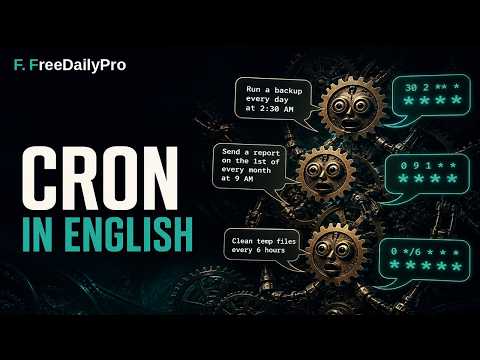

None of this replaces a real development environment, and it isn't trying to. It's the set of tools for the moment you need one specific, correct answer to one specific, small question — without opening a new project, installing a package, or trusting a random site you've never used before with something that might be sensitive.
See the full Developer toolkit